Global Settings
The Global Settings section lets you manage the settings such as password strength and web application hosting scenario on the FASTER applications, determining the password strength to access FASTER Web, and the scenario for hosting FASTER Web.
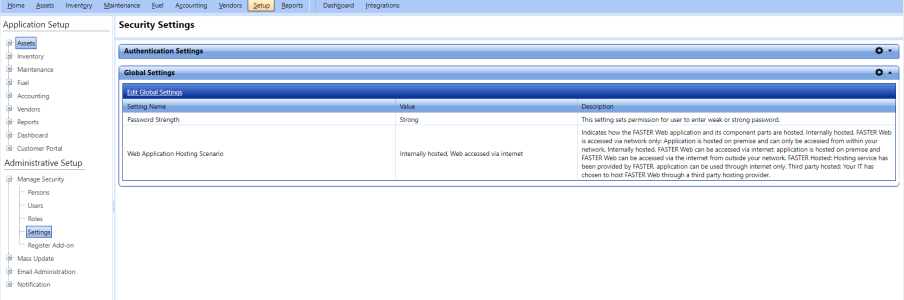
The Edit Global Settings dialog box of the Global Settings section lets you manage the settings such as password strength and web application hosting scenario on the FASTER applications and enabling or disabling Authentication Provider authentication mode.
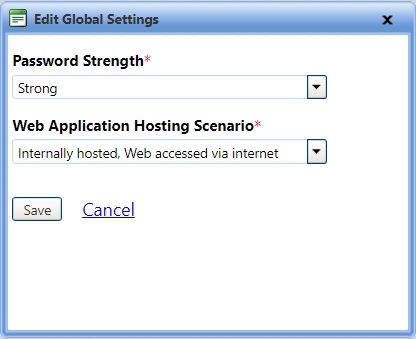
To edit the global settings
- Edit global settings
- Open the Security Settings page.
- In the Global Settings section, click Edit Global Settings.
The Edit Global Settings dialog box opens. - In the Password Strength list, select Strong or Weak.
- Strong, users with the weak password strength must change their password strength to conform with the new password setting, which is strong. A strong password must have a minimum of eight characters and must include at least one uppercase letter, one lowercase letter, a number, and a special character such as @, #, $.
- Weak, the user password strength allowed to sign in to FASTER Web can be weak.
Note: The users accessing FASTER Web using their Active Directory credentials override the password strength setting.
- In the Web Application Hosting Scenario list, select one of the following options:
- Internally hosted: Web accessed via network: FASTER Web is hosted on your premise and is accessed from within your network. This is the default value.
- Internally hosted: Web accessed via internet: FASTER Web is hosted on your premise and is accessed via the internet from outside your network.
- FASTER hosted: Hosting service is provided by FASTER and FASTER Web is accessed through internet only.
- Third party hosted: Hosting service is provided by a third party hosting provider.
Note: ASTER hosted scenario is for FASTER staff only and you will be prompted to enter a password (known to FASTER staff only) whenever you switch the setting to or from FASTER hosted.
- Click one of the following:
- Save to save the information and close the dialog box.
- Cancel to disregard any changes and close the dialog box.