Alert Mapping Settings
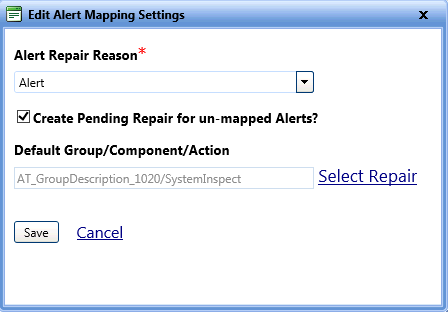
Alert codes are the alphanumeric values assigned to various problems that occur on an asset. The Alert Mapping Settings section lets you define a default repair reason for alerts in FASTER Web. This default repair reason is displayed in the Repair Reason list of the Maintenance > Alert Code Mapping > Map Group/Component/Action and Set Behavior dialog box where you map the alert codes to a repair code. In the Alert Mapping Settings section, you can also configure settings to automatically convert the unmapped alerts to pending repairs.
To edit the alert mapping settings
- Click the Setup module.
- In the Application Setup section, do one of the following:
- Click
 next to the Maintenance option, and then click Settings.
 - In the Maintenance section of Application Setup, click the Settings link.
The Maintenance Settings page opens.
- Click
- In the Alert Mapping Settings section, click Edit Alert Mapping Settings.
The Edit Alert Mapping Settings dialog box opens. - In the Alert Repair Reason list, select a repair reason.
Note: To automatically convert a new unmapped alert to pending repair, select the Create Pending Repair for New Alert check box. Upon selecting this check box, all the new alerts that are not mapped to a repair code are automatically converted to pending repairs.
- Click one of the following:
- Save to save the information and close the dialog box.
- Cancel to disregard any changes and close the dialog box.