Technician
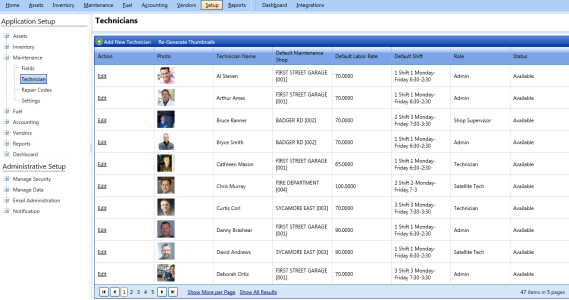
Technician is the person who performs repairs and maintenance activities on FASTER assets and parts. From the Technicians page, you can perform the following:
|
Note: If you are using FASTER Web for the first time, the technicians are not displayed on the Technicians page. Click the Re-Generate Thumbnails link to display thumbnail s of technicians. |
- Click the Setup module.
- In the Application Setup section, do one of the following:
- Click
 next to the Maintenance option, and then click Technician.
 - In the Maintenance section of Application Setup, click the Technicians link.
The Technicians page opens.
Adding Technicians
The Add Technician dialog box lets you add a new technician record in FASTER Web.
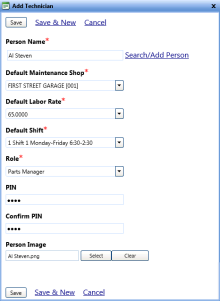
To add a technician record
- Open the Technicians page.
- Click Add New Technician.
The Add Technician dialog box opens. - In the Person Name box, do one of the following:
- Type the name of a person whose details exist in FASTER Web.
- Click the Search/Add Person link to search an existing person record or add a new person record in FASTER Web. For more information, see Searching/Adding Person.
Note: To add a technician record, the details of the person must exist in FASTER Web. For information on adding a person record in FASTER Web, refer Add Persons.
- In the Default Maintenance Shop list, select a default maintenance shop of the technician.
- In the Default Labor Rate list, select the default labor rate charged by the technician.
- In the PIN box, type the PIN number.
Note: Each technician is provided a unique PIN. Technicians must enter this PIN to start activity in the Technician Workstation (TWS).
- In the Confirm PIN box, type the PIN number.
- In the Person box, click Select to browse a person in your computer.
Note: You can click Clear to remove the selected.
- When finished, click one of the following:
- Save to save the information and close the dialog box.
- Save & New to save the information and add another record.
- Cancel to disregard any changes and close the dialog box.
Editing Technician
The Edit Technician dialog box lets you update the details of technicians, reset the technician PIN, make the technician record obsolete or permanently remove technician information from FASTER Web.
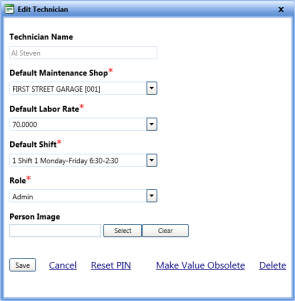
To edit the technician information
- Open the Technicians page.
- Click the Edit link next to a technician record that you want to edit.
The Edit Technician dialog box opens. - Make changes as required.
- Click one of the following:
- Save to save the information and close the dialog box.
- Cancel to disregard any changes and close the dialog box.
- Reset PIN to change the technician's PIN number.
- Make Value Obsolete to hide technician details from the Technician list of Maintenance module.
- Delete to permanently remove the technician from the Technician list of Maintenance module.