History Tab
The History tab lets you view the cost accrued on an asset for a calendar year or a fiscal year.
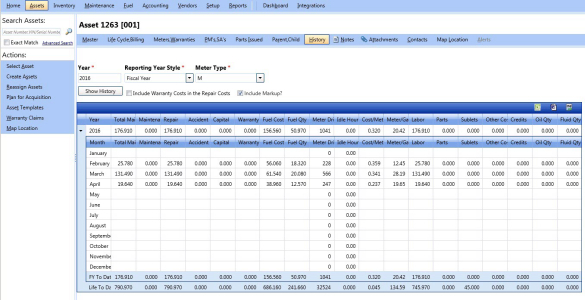
History tab
To view the history of the asset
- Search and view the asset record.
- Click the History tab.
- In the Year box, type the year for which you want to view the asset history.
- In the Reporting Year Style list, select the reporting year style as fiscal year or calendar year.
- In the Meter Type list, select a meter type for which you want to view the asset history.
Note:
- The Meter Type list is displayed only when a meter is assigned to the asset.
- Select the Include Warranty Costs in the Repair Costs check box to include the warranty cost in the repair cost.
- Select the Include Markup? check box to include markup cost to the Total Main & Repair, Repair, Fuel Cost, Labor, Parts, Sublets, Other Costs, Accident Cost, Capital Cost, Maintenance Cost, and Warranty Cost values. If Include Markup? is not selected, markup cost is not added to the asset history.
- Alternatively, to add markup cost, set Include Markup in Asset History by Default? to Yes in the Setup > Asset > Fields > Asset Organization picklist dialog box.
- If Include Markup in Asset History by Default? is set to Yes, the Include Markup? check box appears as selected on the Asset History page by default.
- If Include Markup in Asset History by Default? is set to No, the Include Markup? check box appears as deselected on the Asset History page by default.
- Alternatively, to add markup cost, set Include Markup in Asset History by Default? to Yes in the Setup > Asset > Fields > Asset Organization picklist dialog box.
- Click Show History.
The asset history is displayed.
Exporting the Search Results Grid
You can export the information in a column in the following formats:
- Microsoft Excel (.xls)
- Microsoft Word (.doc)
To export the column information
- In the upper-right corner of the List of Columns grid, click the Microsoft Excel (
 ) or Microsoft Word (
 ).
).
The File Download dialog box opens prompting you to Open, Save, or Cancel. - Click Save.
The Save As dialog box is displayed with the File Type of the selected format. - Browse to the desired location, specify a file name, and then click Save.
The List of Columns grid is saved in the specified format at the specified location.