User Permissions and Roles
On the User Account page, you can assign permissions and roles for the user to access and perform activities in the assigned FASTER Web domains, organizations, storerooms, maintenance shops and fuel sites.
|
Note:
|
User Domains and Roles
The User Domains and Roles section lets you assign and manage the FASTER Web domains such as Assets and Maintenance to the user account, and define roles that the user can perform in these domains. The users access is limited to the domains assigned to each user.
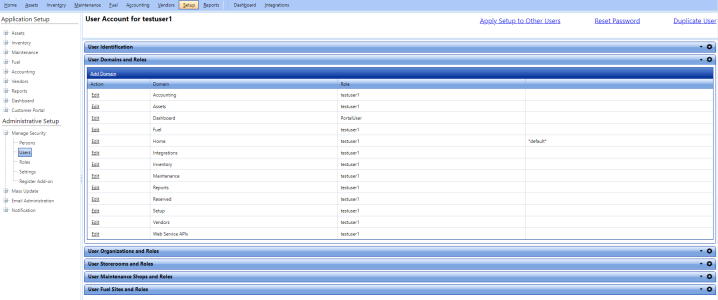
From the User Domains and Roles section, you can perform the following activities:
Adding Domain
From the Add Domain dialog box, you can assign access to the user to work on different domains of FASTER Web such as Assets, Inventory, Maintenance, Setup, Integrations, and Dashboard. You can also assign roles to the user. The administrative rights that the user holds, depend on the role assigned to the user.
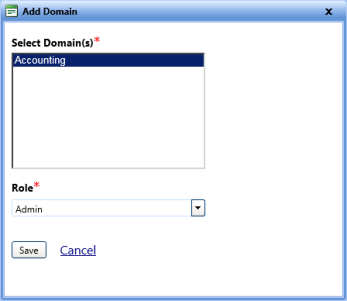
To add domain to the user
- Open the Manage Users page.
- Click the View link next to the username.
The User Account page opens. - In the User Domains and Roles section, click the Add Domain link.
The Add Domain dialog box opens. - In the Select Domains list, select the domain(s) as required.
- In the Role list, select the role as required.
- When finished, click one of the following:
- Save to save the information and close the dialog box.
- Cancel to disregard any changes and close the dialog box.
Editing Domain
The Edit Domain dialog box displays the existing domain and role of the user. With required permission, you can set the domain as default and modify the role of the user.
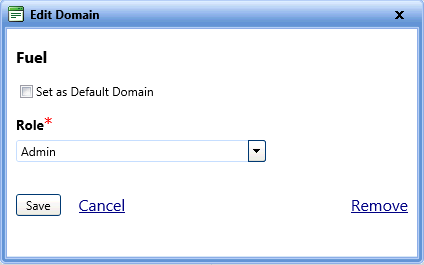
To modify the domain of the user
- Open the Manage Users page.
- Click the View link next to the username.
The User Account page opens. - In the User Domains and Roles section, click the Edit link next to the domain that you want to edit.
The Edit Domain dialog box opens. - To set the domain as default, select the Set as Default Domain check box.
Note: When a domain is set as default, it cannot be reverted or removed from the user account.
- In the Role list, select the role of the user in the domain.
- Click one of the following:
- Save to save the information and close the dialog box.
- Cancel to disregard any changes and close the dialog box.
- Remove to remove the domain from the user domains list.