Repair Component
Components refer to different portions of a part that constitute a complete part.
From the Component tab, you can perform the following actions:
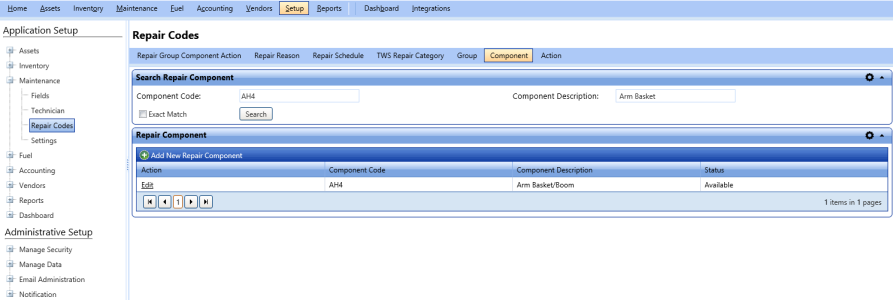
Repair component tab
Adding New Repair Component
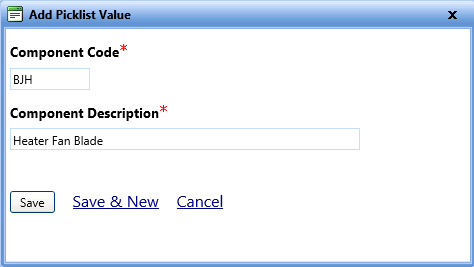
The Add Picklist Value dialog box lets you add a new repair component in FASTER Web.
To add a new repair component
- Open the Repair Codes page.
- Click the Component tab.
- In the Repair Component section, click Add New Repair Component.
The Add Picklist Value dialog box opens. - In the Component Code box, type a code for the repair component.
- In the Component Description box, type a brief description about the component.
- Click one of the following:
- Save to save the information and close the dialog box.
- Save & New to save the information and add another record.
- Cancel to disregard any changes and close the dialog box.
Editing Repair Component
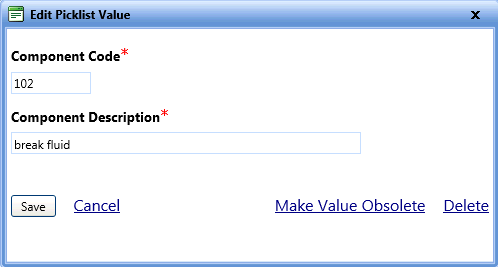
The Edit Picklist Value dialog box lets you modify the existing component information if the component is not assigned to a repair group.
|
Note: You can modify the component information only if the component is not assigned to a group. After you create a group-component-action association from the Repair Group Component Action tab, you cannot delete or modify the component code and description. You can make the component obsolete and add a new component if required. |
To search and edit the repair component
- Open the Repair Codes page.
- Click the Component tab.
- In the Search Repair Component section, Specify the following search parameters:
- In the Component Code box, type a code for the component.
- In the Component Description box, type a brief description about the component.
Note: Select the Exact Match check box if you are sure about the specified component code and component description.
- Click Search.
The Repair Component grid displays the search results along with the following information:- Component Code
- Component Description
- Status
- Click Edit next to a repair component that you want to edit.
The Edit Picklist Value dialog box opens. - In the Edit Picklist Value dialog box, change the Component Code and Component Description fields as required.
- When finished, do one of the following:
- Save to save the information and close the dialog box.
- Cancel to disregard any changes and close the dialog box.
- Make Value Obsolete to temporarily hide the component code from the component list.
- Delete to permanently delete the component code from FASTER Web.