Repair Group
A repair group is a name given to a function or an individual part of a FASTER asset.
From the Group tab, you can perform the following:
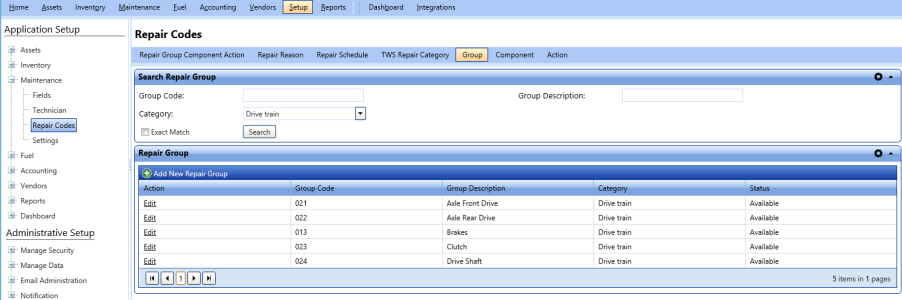
Adding New Repair Group
The Add Picklist Value dialog box lets you add a new repair group in FASTER Web.
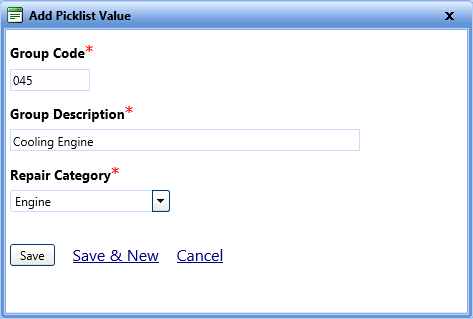
To add a new repair group
- Open the Repair Codes page.
- Click the Group tab.
- In the Repair Group section, click Add New Repair Group.
The Add Picklist Value dialog box opens. - In the Group Code box, type a code for the repair group.
- In the Group Description box, type a brief description about the group.
- In the Repair Category list, select a category for the group.
- When finished, click one of the following:
- Save to save the information and close the dialog box.
- Save & New to save the information and add another record.
- Cancel to disregard any changes and close the dialog box.
Editing Repair Group
The Edit Picklist Value dialog box lets you modify the existing group information.
|
Note: You can modify the group information only if components and actions are not assigned to it. After you create a group-component-action association from the Repair Group Component Action tab, you cannot delete or modify the group information. You can make the group obsolete and add a new group if required. |
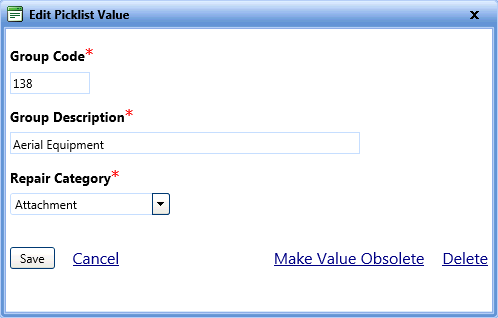
To search and edit repair group
- Open the Repair Codes page.
- Click the Group tab.
- In the Search Repair Group section, Specify the following search parameters:
- In the Group Code box, type a group code.
- In the Group Description box, type a brief description about the group.
- In the Repair Category list, select a category.
Note: Select the Exact Match check box if you are sure about the specified group code and repair category.
- Click Search.
The Repair Group grid displays the search results along with the following information:
- Group Code
- Group Description
- Category
- Status
- Click Edit next to a repair group that you want to edit.
The Edit Picklist Value dialog box opens. - Make changes as required.
- When finished, click one of the following:
- Save to save the information and close the dialog box.
- Cancel to disregard any changes and close the dialog box.
- Make Value Obsolete to temporarily hide the group.
- Delete to permanently delete the group from the FASTER Web.