Repair Reason
The Repair Reason tab lets you add and modify reasons for repair of FASTER assets and parts.
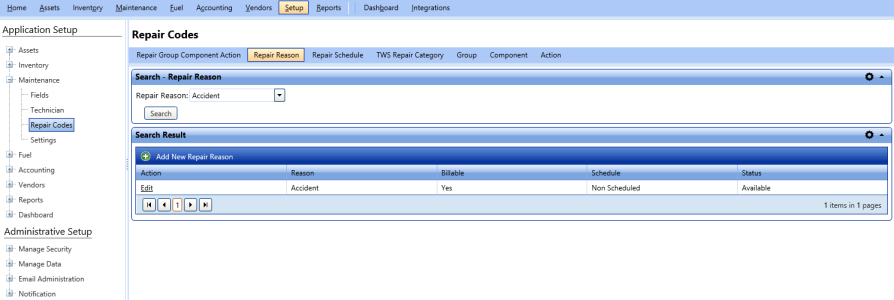
Adding New Repair Reason
The Add New Repair Reason dialog box lets you add a new reason for asset and part repair.
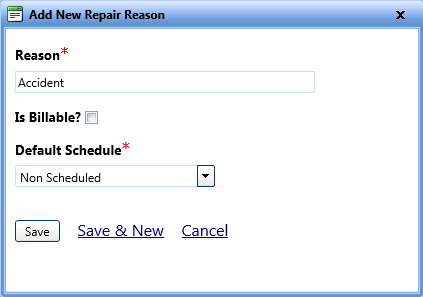
To add a new repair reason
- Open the Repair Codes page.
- Click the Repair Reason tab.
- In the Search Result section, click Add New Repair Reason.
The Add New Repair Reason dialog box opens. - In the Reason box, type a repair reason.
Note: Select the Is Billable? check box if the reason is billable.
- In the Default Schedule list, select Scheduled or Non Scheduled as applicable.
- When finished, click one of the following
- Save to save the information and close the dialog box.
- Save & New to save the information and add another record.
- Cancel to disregard any changes and close the dialog box.
Editing Repair Reason
The Edit Repair Reason lets you modify the existing repair reason.
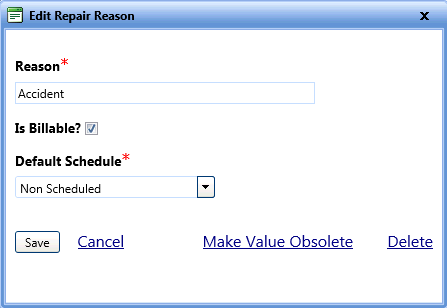
To search and edit repair reason
- Open the Repair Codes page.
- Click the Repair Reason tab.
- In the Search - Repair Reason section, select the repair reason from the Repair Reason list.
- Click Search.
The Search Result grid displays the repair reason information. - Click Edit next to the reason.
The Edit Repair Reason dialog box opens. - Make the required changes.
- When finished, do one of the following:
- Save to save the information and close the dialog box.
- Cancel to disregard any changes and close the dialog box.
- Male Value Obsolete to temporarily hide the reason from the Repair Reason list.
- Delete to permanently delete the reason from FASTER Web.